Questo articolo è al momento disponibile solo in inglese.
Building LeopardID: AI Wildlife Identification with Computer Vision, Azure and Offline Mobile Apps
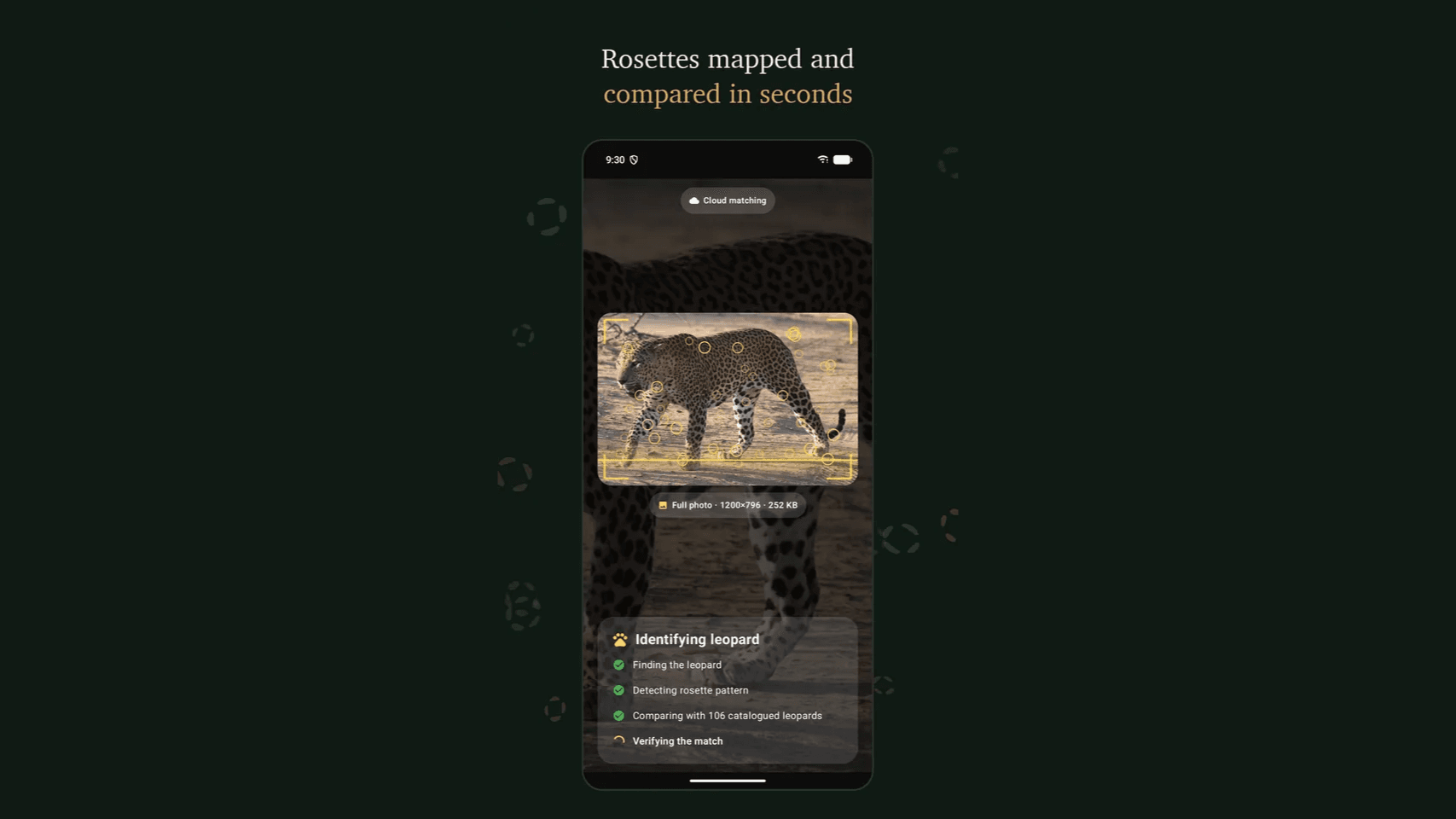
Every leopard carries a coat of rosettes that no other leopard shares. For the trackers and researchers who follow Sri Lanka's leopards, that pattern works like a fingerprint, but matching it by eye against hundreds of photos is slow and depends on the memory of a few experienced people. LeopardID is Mickiesoft's answer: an AI wildlife identification platform that reads the rosette pattern in a single photo and tells a ranger which individual leopard they are looking at, even deep inside a national park with no mobile signal. It is a practical example of AI for wildlife conservation.
This case study walks through how we built it, covering computer vision, on-device machine learning, an Azure backend and native mobile apps. The same stack applies to many other industrial and enterprise problems.
The Challenge: Identifying Individual Leopards in the Wild
Sri Lanka's dry-zone parks (Yala, Wilpattu and Kumana) hold some of the densest leopard populations in the world. Conservation work depends on knowing which leopard was seen, where and when. The field reality made that hard:
- No connectivity. Most sightings happen far beyond the last bar of signal, so a cloud-only app would fail exactly where it is needed.
- Imperfect photos. Trail-camera frames and phone shots arrive at every angle, distance and lighting condition, often with grass or branches covering part of the flank.
- Left and right flanks differ. A leopard's left side and right side have completely different patterns, so the system has to know which side it is looking at before it compares anything.
- Knowledge locked in people. Identification records lived in spreadsheets, photo folders and the heads of individual trackers.
The Solution: One Photo, a Confirmed Identity
LeopardID turns identification into three steps that work the same whether the photo comes from a ranger's phone in Wilpattu or a static trail camera at a waterhole:
- Capture in the field. A tracker photographs a flank in the app. GPS and time are tagged automatically, with no signal required.
- Compare rosettes instead of guessing. The engine maps the spot geometry across the flank and scores it against every individual in the catalog.
- Sync when back in range. A confirmed match, or a newly enrolled individual, is written to the shared record the moment the device reconnects.
Park authorities and researchers use a web admin console to review sightings submitted from the field, confirm or reject matches, browse the catalog by individual or park, and manage tracker accounts. The result is a record that outlasts any one tracker's memory.
AI Development: The Computer Vision Pipeline
A single classifier would not be enough, so we built LeopardID as a multi-stage computer vision pipeline. Each stage is a small, specialised model:
1. Leopard Detection and Flank Orientation
A leopard detector first finds the animal in the frame and crops it, which removes the background, other animals and the vehicle bonnet. A second model, the flank-orientation classifier, decides whether the crop shows the left or the right side. That decision halves the search space and prevents false matches between the two sides of different leopards.
2. Deep-Learning Embeddings for Fast Candidate Search
We trained a MobileNetV4-based identification model in PyTorch that turns a flank into a compact embedding. Similar coats land close together in that space, so the app can shortlist likely individuals in milliseconds. MobileNet was a deliberate choice because it is accurate enough to rank candidates and small enough to run on a mid-range Android phone.
3. Rosette-Level Verification with Feature Matching
Ranking alone is not proof. On the server, candidates are verified with classical computer vision: SIFT keypoints are extracted from the rosettes, matched with a ratio test, and checked for geometric consistency with RANSAC. A match is accepted only if enough inliers survive. This combination of deep learning for recall and geometric matching for precision is what makes the result trustworthy to a field biologist.
4. Human-in-the-Loop Review and Retraining
Every sighting passes through a review queue in the admin console. When a leopard does not match anyone on file, trackers can enrol it as a new individual, and a background training job retrains the models so the catalog keeps improving with every season in the field.
On-Device Machine Learning for Offline Identification
The main engineering decision was to run the models on the phone. The trained PyTorch models are exported to two formats:
- ONNX for Android, executed with ONNX Runtime
- Core ML (
.mlpackage) for iOS
The export is scripted, so a single command regenerates every mobile model from the latest training run and nobody edits model files by hand. Along with the models, the app ships an offline bundle containing the catalog, leopard profiles, photos, sighting history and park maps. A tracker can identify a leopard, review its history and plot the sighting on a map without any connectivity, which makes LeopardID a true offline-first mobile app.
When a signal is available, the app can also use cloud matching, which runs the full verification pipeline on the server for maximum accuracy.
Mobile App Development: Native Android and iOS
The field app is built natively for each platform so we could get full control over the camera, background sync and on-device inference.
Android: Kotlin Jetpack Compose App
- Kotlin Jetpack Compose for a modern, declarative UI
- CameraX for reliable in-field capture
- ONNX Runtime Android for on-device inference
- Retrofit for the API layer, with an offline-first sync queue for sightings recorded out of range
- osmdroid for offline park maps
- Firebase Crashlytics for production stability monitoring
LeopardID for Android is available on Google Play and supports Android 8.0 and later.
iOS: SwiftUI and Core ML
The iOS app is written in SwiftUI and runs the same detection, orientation and identification models through Core ML, sharing the backend API contract with Android.
Mobile CI/CD
Every push to main runs unit tests and lint and builds an APK in GitHub Actions. Device tests run on Firebase Test Lab, R8 shrinking keeps the release lean, and fastlane builds and ships the signed Android App Bundle to Google Play.
Azure Cloud Backend: FastAPI, Azure SQL and CI/CD
The backend is a Python FastAPI service running on Microsoft Azure, with a fully automated Azure cloud deployment:
- Azure Virtual Machine running the API behind nginx as a systemd service, sized to keep hosting costs low for a conservation budget
- Azure SQL Database for leopards, sightings, users, the review queue and app-version policy
- A lean serving footprint: training-only dependencies such as PyTorch are kept out of production, so the API runs comfortably on a small VM
- Secure authentication: JWT access tokens with rotating refresh tokens, email OTP verification, Google and Facebook sign-in, and role-based access for trackers and administrators
Deployment is fully automated. A push to main triggers a GitHub Actions workflow that compiles and tests the backend against a stubbed database, syncs the code to the Azure VM, installs dependencies, restarts the service and runs health checks against the API, the admin console and the public site. Pull requests run the test stage only, so broken code does not reach production.
Results and Impact
- Identification in seconds from a single flank photo, where manual matching used to take much longer
- Fully offline field capture, including matching, profiles and maps
- A shared, reviewable catalog of individually identified leopards across Kumana, Wilpattu and Yala
- A system that keeps learning, since each confirmed sighting and each new individual strengthens the models
Lessons for AI and Mobile Projects
These lessons from LeopardID apply to AI product development in general, and not only to wildlife:
- Design for the edge first. If users work offline, the model belongs on the device. Choose architectures such as MobileNet that fit a phone and plan for ONNX or Core ML from the start.
- Combine deep learning with classical computer vision. Embeddings give recall and geometric verification gives precision that users can trust.
- Keep a human in the loop. A review queue turns model uncertainty into better training data.
- Separate training from serving. A lean inference service keeps cloud costs predictable.
- Automate everything. CI/CD for models, backend and mobile apps is what lets a small team ship reliably.
Build Your AI Product with Mickiesoft
LeopardID shows what Mickiesoft does as an AI development company in Sri Lanka: we take a hard real-world problem and deliver a complete product that includes custom computer vision app development, on-device machine learning, native Android and iOS mobile app development in Sri Lanka, and a secure, cost-efficient Azure cloud backend with automated CI/CD. The same approach works for visual inspection, document and asset recognition, field-service apps and any mobile workflow that has to run offline.
If you are planning an AI, Azure or mobile app project, we would be glad to hear about it.
Planning an AI, Azure or mobile app project?
Talk to Mickiesoft about computer vision, on-device machine learning, Azure cloud and native mobile app development.
Contact UsDomande frequenti
Trova le risposte alle domande più comuni sui nostri servizi, sul nostro metodo di lavoro e sulle nostre competenze.